

Event Activity
The Event Activity tab shows everything a visitor did, in order, grouped by session. Use it when a number on the Summary tab raises a question and you want to see what actually happened.
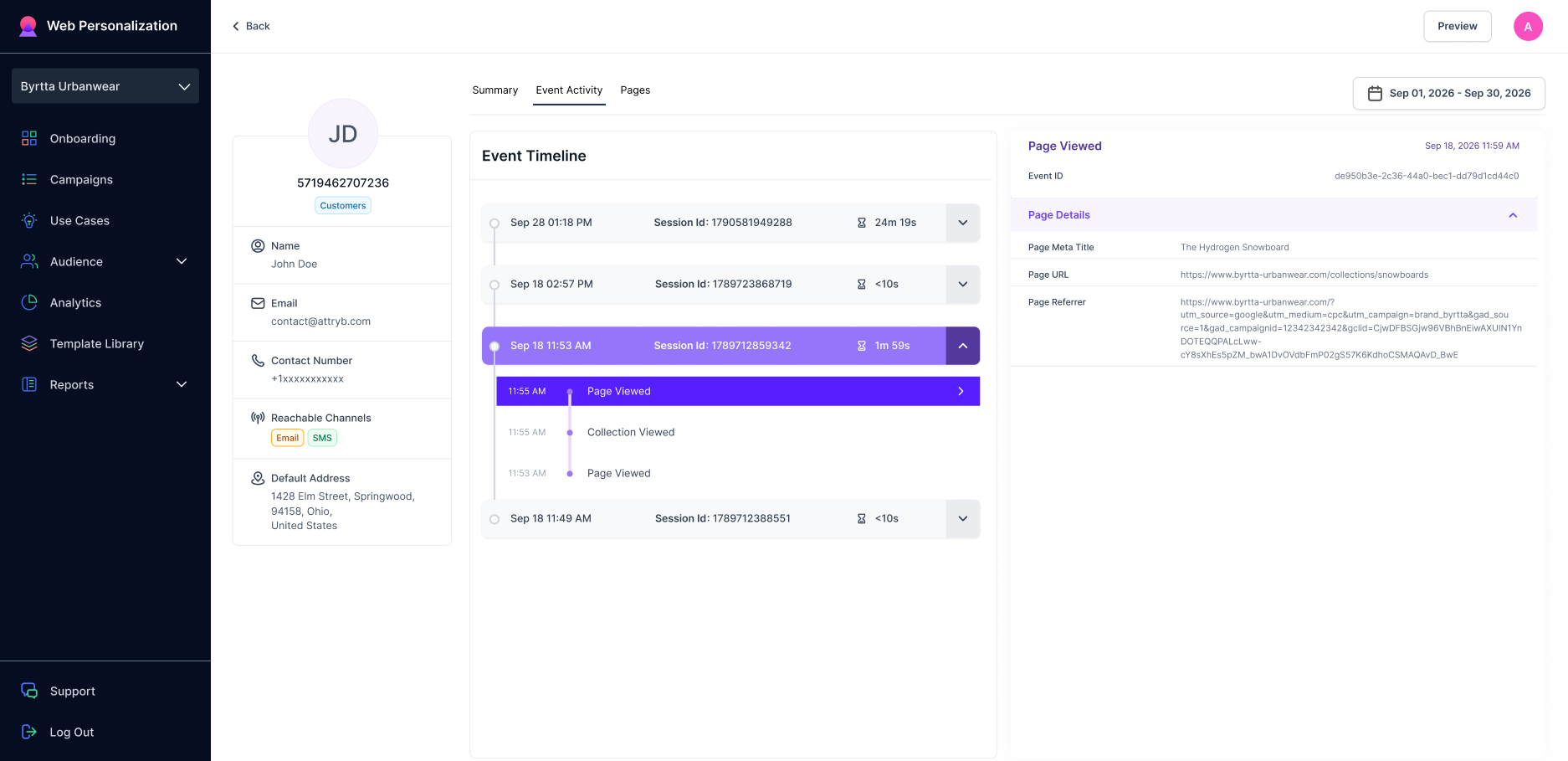
Event Activity page for a visitor showing all visitor events for selected time frame
The screen has two halves. The Event Timeline on the left lists the sessions. The Session Level Summary on the right describes whichever session you have open.
Event Timeline
Sessions are listed newest first. Each session header shows:
- The date and time the session started
- The Session ID
- How long the session lasted
Click a header to open or close that session. Open one and you see every event in it, each with the time it happened. The newest event is at the top.
Events you will see include Page Viewed, Collection Viewed, Products Searched, Product Viewed, Product Added, and Product Removed. For the full list of what Attryb records, see Tracked events.
Reading a session from the bottom up tells you the story in the order it happened: landed, searched, viewed a product, added it, removed it again.
Session Level Summary
Click a session to load its details on the right. The panel is split into five groups.
General
| Field | What it means |
|---|---|
| Date | The day of the session |
| Duration | How long the session lasted |
| Start Time | When the session began |
| Page Views | Pages opened in this session |
| Product Page Views | Product pages opened in this session |
| Product Added to Cart | Items added during this session |
| Last Cart Status | Whether their cart was empty or had items in it |
| Checkouts Started | Checkouts begun in this session |
| Checkouts Abandoned | Checkouts begun and not finished |
| Orders Created | Orders placed in this session |
Revenue Metrics
Money from this one session: Gross Revenue, Discount, Discount Code, Revenue (Net Discounts), Tax, Shipping, and Net Revenue.
Discount Code shows the code the visitor actually used, which is how you check whether a campaign's code is being redeemed.
Source Details
Where the session came from.
| Field | What it means |
|---|---|
| Campaign Source | The source the visit is credited to, such as google |
| Initial Referrer URL | The exact page they arrived from |
| Initial Referrer Domain | The site they arrived from |
| Campaign Medium | The kind of traffic, such as cpc or email |
| Campaign Name | The campaign in your ad or email tool |
| Campaign Content | The specific ad or link, when it is tagged |
These come from the UTM tags on the link the visitor clicked. Untagged links leave fields blank.
Visitor Device Details
IP address, screen height and width, user agent, and default language.
Screen width is the quickest way to tell whether someone was on a phone when a popup did or didn't fire.
Location Details
Postal code, city, and country for the session.
Date range
The date picker at the top right limits which sessions appear. Widen it to see further back.
Updated about 1 month ago